Power Automate Try Catch with Do Until
Power Automate Try Catch with Do Until
Power Automate Try Catch with Do Until in my opinion is interesting pattern which I used in Flows. In this blog post I will explain how to configure it and how this pattern is working.
Table of content:
General idea of Try Catch
Before moving forward I will briefly explain what is Try Catch. If this pattern looks like interesting I added references to an article of other Authors which I found around this topic.
For me basic principle of Try Catch is that there are two blocks of operations where Catch block should be executed if something wrong happen in Try. Such a block in Power Automate is Scope action. Which can be found under Control group:

I would say that Scope is basically container for other actions. It is good action to organize Flows but there is other important feature of it. I will explain that in a second.
HINT
If you are copy Scope all actions from it, are also copied.
Next part of Try Catch is setting of Run After by default Flow will run only if action ABOVE it finished successful – that is why it is called like that:P. By using Run After I can decide if an action should be executed for failed, timeout, skipped actions.

And this is the most important feature of Scope as if any action in it will fail/timeout/skipped the whole Scope will have the same result:

Hope you are starting to feel why scope is such great action and why I want to use it. Basically I want to prevent my Flows to fail and not take any action about that. Try Catch is used to add error handling to Flows. My personal preference is to know that something when wrong and contact User than User is contacting me and I’m unaware…
Why Do Until
I described in my previous blog how Do Until function is working. And combining it with Try Catch creates a great duo.
Basic pattern of Try Catch allows taking one attempt and then act if something get wrong. For me, it was not enough, therefore I started to think. How I can achieve the result of multiple attempts? I wanted to try a couple of times to perform the same operation. As there is many cases when there is glitch, delay or “freeze” in the system with which Flow is interacting. If the first attempt failed after small delay the second try can be successful.
And this is where Do Until comes to play. By connecting Do Until with Try Catch I can take couple retires and if that will still not work Flow executes fail/timeout/skip scenario.
This is the basic idea of Power Automate Try Catch with Do Until so now I can show how to configure it.
Configuration
First I need to add one variable to control Do Until loop execution. For me, it will be boolean variable (varLoop) set to false:

Try
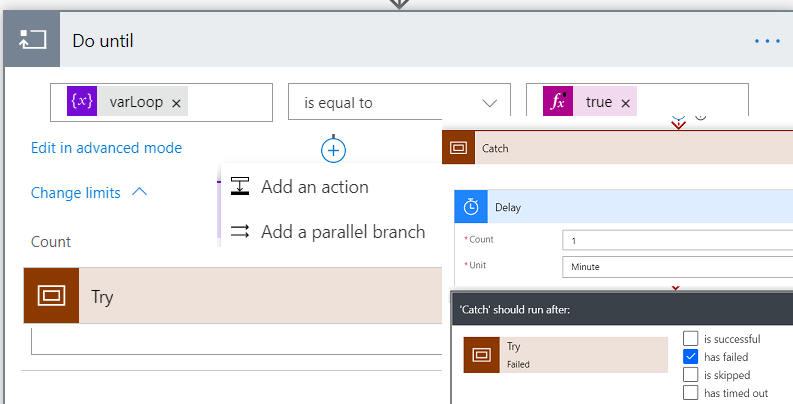
Next depending on the purpose of the Flow I can add other actions or right away goes to my business and add Do Until. Loop condition is set to varLoop which should equals to true:

In change limits I’m using only Count property as I want for the loop to execute a specific number of times.
Into the loop, I add Scope action. Can now fill Scope action any operations which I want to execute.
Below Scope, I need to add two branches. First branch is to change the value of varLoop to true. This is for the case if Scope executed correctly and loop should finish (meet the condition):

Next bit which I need to add is handling if something goes wrong.

To do that I need to use Add a parallel branch.
HINT
I love parallel branch as I can split the Flow and later connect branches and such configuration can speed up run time.
Catch
In the parallel branch I’m adding next Scope (Catch) and Delay action. I’m using Delay to give a moment to “catch breath” and then try again. Do Until loop start next iteration as Loop Condition is not meet.

Of course, I need also configure run after with has failed option selected.
HINT
In the Catch I can add also other actions which should be executed for instance sending notification.
Finally
And it is the best part of Power Automate Try Catch with Do Until. With current configuration I’m trying to execute Try five times but if this will not work Do Until finish (Count limit =5). Finally, is configured after Do Until and I can further drive Flow run and add branches for Success and Fail scenarios:

HINT
In this demonstration I’m just using Compose but again Scopes can be used to better organize Flow.
Example use case
Maybe it is quite late for me to write about use case but I preferred to explain the pattern first.
One of use cases for Power Automate Try Catch with Do Until are API, synchronous calls (timeout of such is 120s).
But for me, it was useful in the following scenario:
After Approval action document (stored in SharePoint) should be moved to a dedicated folder. I notice that in many cases after Approval Flow failed because Approver just closed document. Document was still locked, the lock was not released and that was the challenge.

To handle this issue I used my pattern, with configuration as above. To what I described in configuration section I added:
In Scope action I decided to use Switch to set variable with folder path. Next variable was used in Move file action.
If the Try failed in Catch I send email asking User who was Approver to close the file and then process stopped for 5 minutes.
Finally, if Do Until loop would fail Admin of solution is notified and can move file manually.
Summary
Hope you like Power Automate Try Catch with Do Until pattern and it will be useful for you while building your Flows.
Personally very much like it and use it when I feel or experience issues with Flow execution and want to give the process one more or more tries to complete correctly.
Think I have at least one more interesting way to use Do Until so stay tuned.
References
If the topic of the Try Catch is interesting for you, don’t miss the following articles:
- Tomasz Poszytek: https://poszytek.eu/en/microsoft-en/office-365-en/powerautomate-en/try-catch-pattern-in-microsoft-flow/
- Rob Windsor: https://blogs.msmvps.com/windsor/2019/04/25/microsoft-flow-error-handling/
- Serge Luca: https://sergeluca.wordpress.com/2018/03/12/pattern-for-microsoft-flow-error-handling/
- Marcel Haas: https://www.thatmarcelhaas.com/post/advanced-error-handling-in-microsoft-flow
- Pieter Veenstra: https://sharepains.com/2018/06/06/microsoft-flow-advanced-error-handling-throw-in-flow/
One thought on “Power Automate Try Catch with Do Until”
Comments are closed.